TrueK8S Part 09
Tying It All Together
We’ve finally configured all of the infrastructure components of our cluster. We have Flux, secure secret management, certificate management, ingress, and a backup/replication solution. We’re finally ready to deploy a Helm chart that takes advantage of all of these features in our cluster.
I can’t think of a better example than Nextcloud. Nextcloud was something I had always wanted to host in my homelab to de-consumer-cloud my life, but I never quite got around to it. I never had a solution that felt stable enough to depend on. Through this project, I’ve finally figured out answers to the storage, secure access, and resilience concerns I had about running Nextcloud myself. If you’ve been following along, you should be well equipped to do the same.
Mounting NFS share for Nextcloud
Before we get started, we need to configure an NFS share for Nextcloud. In Part 7 I was complaining about how NFS was a poor solution for PVC storage. That is true, but there are some cases in which NFS makes sense. Nextcloud will have a particularly large dataset, and it doesn’t make sense to stuff that data into a PVC and try to manage it with VolSync. It makes more sense to keep that data external and to do snapshots/backups on the storage side. I’ll be hosting an NFS share on my TrueNAS server.
Configure the Share
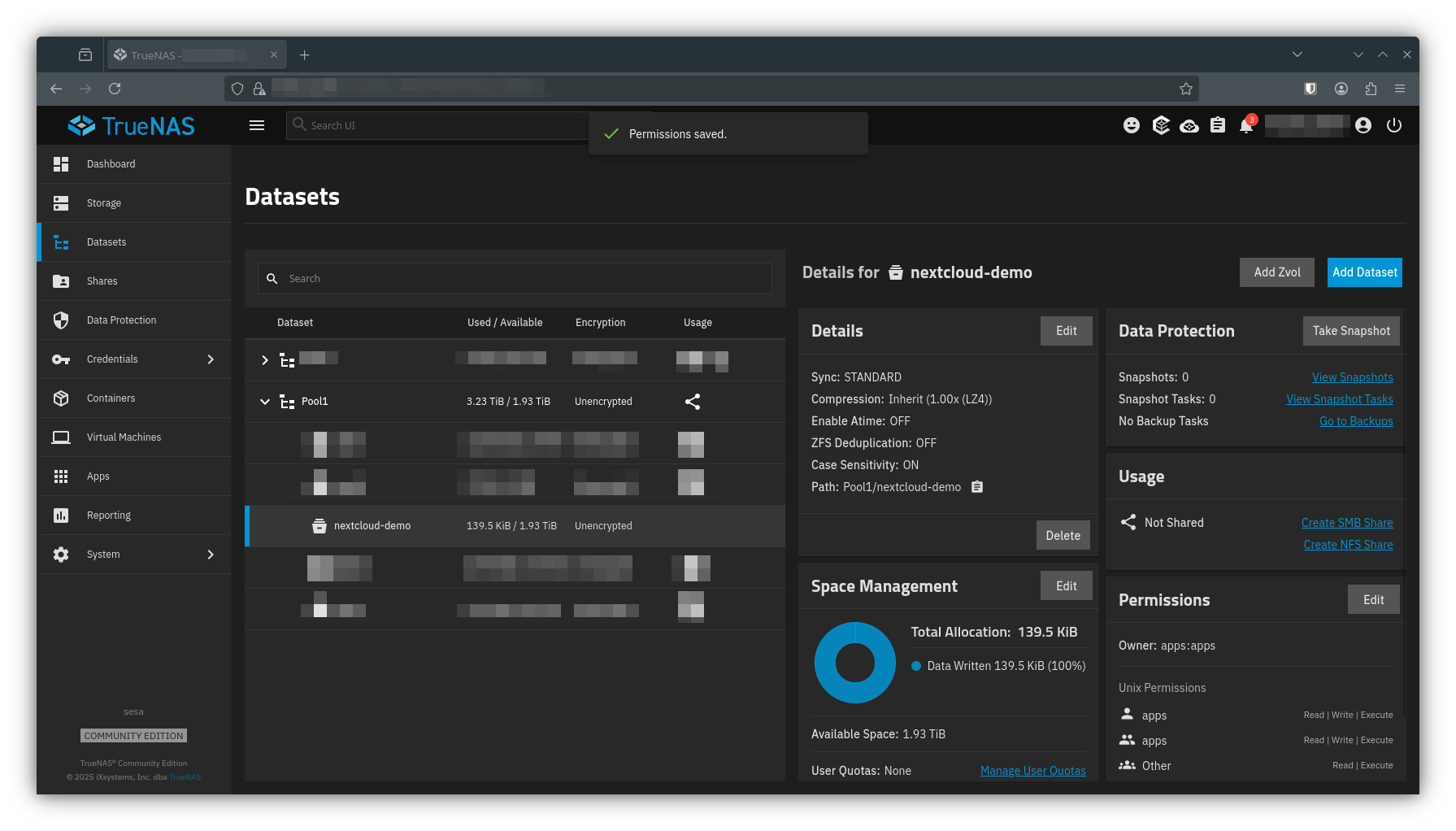
Details of configuring an NFS share are beyond the scope of this series, but I will summarize by showing you the dataset I’m sharing. Note the permissions are set to ‘apps:apps’ which is the security context for TrueCharts apps (coming from the default apps user in TrueNAS). Also note below how the path you see in TrueNAS relates to the NFS patch you’ll use in your cluster config.
Save Secrets in cluster-config
You’ll need to save some config options for Nextcloud, so get those in your ConfigMap first. You need to create a username and password, specify your NFS server IP and path, and also a unique credential for the collabora service account. Collabora will complain if there are non-alphanumeric characters in its password, so look out for that.
apiVersion: v1
kind: ConfigMap
metadata:
    name: cluster-config
    namespace: flux-system
data:
    NEXTCLOUDDEMO_PASSWORD: PASSWORD
    NEXTCLOUDDEMO_USER: USERNAME
    NEXTCLOUDDEMOCOLLABORA_PASSWORD: PASSWORD #ALPHANUMERIC ONLY
    NEXTCLOUDDEMO_NFS_PATH: /mnt/Pool1/nextcloud-demo
    NEXTCLOUDDEMO_NFS_IP: 192.168.XX.X
Then go ahead and save your ConfigMap and push it to the repo
$ sops -e -i cluster-config.yaml
$ git add -A && git commit -m 'added nextcloud secrets to cluster-config'
$ git push
Deploying Nextcloud
Create deployment manifests for Nextcloud. Remember, we’ll define the application itself in the apps directory, and then use a kustomization in production to apply it.
apps
├── general
│ └── nextcloud-demo
│   ├── helm-release.yaml
│   ├── kustomization.yaml
│   └── namespace.yaml
└── production
    └── nextcloud.yaml
./apps/general/nextcloud
helm-release.yaml
There are a couple unique items to pay attention to in this manifest.
- I’m using a custom ingress route to route /collabora traffic to a different service
- The NFS share is declared as a persistence item
- The CNPG recovery configuration is staged but commented out
- Cleanup for VolSync is disabled
- spec.value.podOptions.hostUsers is set to true - this prevents an odd ‘no space left on device issue’ and I recommend this for all of your charts.
apiVersion: helm.toolkit.fluxcd.io/v2
kind: HelmRelease
metadata:
    name: nextcloud-demo
    namespace: nextcloud-demo
spec:
    interval: 5m
    chart:
        spec:
            chart: nextcloud
            sourceRef:
                kind: HelmRepository
                name: truecharts
                namespace: flux-system
            interval: 5m
    install:
        createNamespace: true
        crds: CreateReplace
        remediation:
            retries: 1
    upgrade:
        crds: CreateReplace
        remediation:
            retries: 1
    timeout: 30m
    values:
      podOptions:
        hostUsers: true
      global:
        stopAll: false
      credentials:
        backblaze:
          type: s3
          url: "${S3_URL}"
          bucket: "${S3_BUCKET}-nextcloud-demo"
          accessKey: "${S3_ACCESS_KEY}"
          secretKey: "${S3_SECRET_KEY}"
          encrKey: "${S3_ENCRYPTION_KEY}"
      ingress:
        main:
          enabled: true
          ingressClassName: internal
          integrations:
            traefik:
              enabled: false
            certManager:
              enabled: true
              certificateIssuer: letsencrypt-domain-0
          hosts:
            - host: nextclouddemo.${DOMAIN_0}
              paths:
                - path: /
                  pathType: Prefix
        cloudflare:
          enabled: true
          ingressClassName: cloudflare
          integrations:
            traefik:
              enabled: false
          hosts:
          - host: nextclouddemo.${DOMAIN_0}
            paths:
            - path: /collabora/
              pathType: Prefix
              overrideService:
                name: collabora
                port: 9980
            - path: /
              pathType: Prefix
      cnpg:
        main:
          cluster:
            singleNode: true
#          mode: recovery
          backups:
            enabled: true
            credentials: backblaze
            scheduledBackups:
              - name: daily-backup
                schedule: "0 0 0 * * *"
                backupOwnerReference: self
                immediate: true
                suspend: false
          recovery:
            method: object_store
            credentials: backblaze
      persistence:
        config:
          accessModes:
            - ReadWriteMany
          volsync:
          - name: config
            type: restic
            cleanupTempPVC: false
            cleanupCachePVC: false
            credentials: backblaze
            dest:
              enabled: true
            src:
              enabled: true
              trigger:
                schedule: 10 1 * * *
        data:
          enabled: true
          type: nfs
          path: ${NEXTCLOUDDEMO_NFS_PATH}
          server: ${NEXTCLOUDDEMO_NFS_IP}
        html:
          accessModes:
            - ReadWriteMany
          volsync:
          - name: html
            type: restic
            cleanupTempPVC: false
            cleanupCachePVC: false
            credentials: backblaze
            dest:
              enabled: true
            src:
              enabled: true
              trigger:
                schedule: 20 1 * * *
      nextcloud:
        clamav:
          enabled: true
          infected_action: delete
        collabora:
          enabled: true
          password: "${NEXTCLOUDDEMOCOLLABORA_PASSWORD}"
          dictionaries:
            - en_US
        credentials:
          initialAdminPassword: "${NEXTCLOUDDEMO_PASSWORD}"
          initialAdminUser: "${NEXTCLOUDDEMO_USER}"
        general:
          accessIP: ${NGINX_IP}
          default_phone_region: US
namespace.yaml
apiVersion: v1
kind: Namespace
metadata:
    name: nextcloud-demo
kustomization.yaml
apiVersion: kustomize.config.k8s.io/v1beta1
kind: Kustomization
resources:
  - namespace.yaml
  - helm-release.yaml
./apps/production/
nextcloud.yaml
apiVersion: kustomize.toolkit.fluxcd.io/v1
kind: Kustomization
metadata:
  name: nextcloud-demo
  namespace: flux-system
spec:
  interval: 10m
  path: apps/general/nextcloud-demo
  prune: true
  sourceRef:
    kind: GitRepository
    name: flux-system
And don’t forget to add nextcloud-demo.yaml to the production kustomization
apiVersion: kustomize.config.k8s.io/v1beta1
kind: Kustomization
resources:
  - nextcloud-demo.yaml
Finally, commit your changes and watch
git add -A && git commit -m "added nextcloud-demo"
git push

$ flux events --watch | grep nextcloud-demo
0s      Normal  Progressing     Kustomization/apps      Kustomization/flux-system/nextcloud-demo created
0s      Normal  Progressing     Kustomization/nextcloud-demo    Namespace/nextcloud-demo created
                                                                HelmRelease/nextcloud-demo/nextcloud-demo created
0s      Normal  ReconciliationSucceeded Kustomization/nextcloud-demo    Reconciliation finished in 104.88413ms, next run in 10m0s
0s      Normal  ChartPullSucceeded      HelmChart/nextcloud-demo-nextcloud-demo pulled 'nextcloud' chart with version '40.4.1'
This will take quite some time to spin up. Be patient and inspect the results as it works. You can check the Longhorn console to view volumes as they’re created.
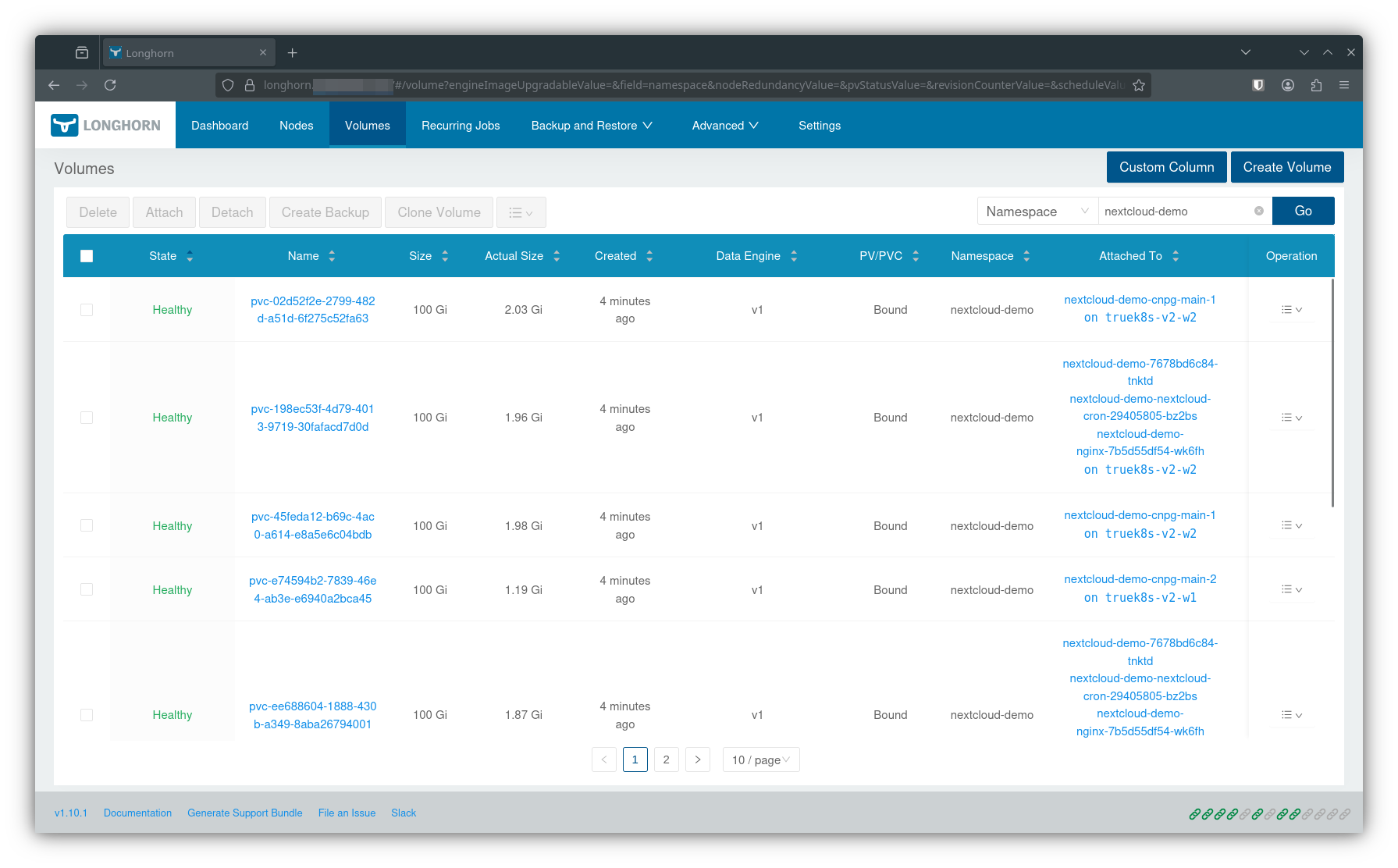
And you can watch the status of the containers as they spin up to monitor progress:
$ kubectl get pods -n nextcloud-demo --watch
NAME READY STATUS RESTARTS AGE
nextcloud-demo-7678bd6c84-tnktd 0/1 Pending 0 10s
nextcloud-demo-clamav-76d59bb979-jfz2r 0/1 Init:0/2 0 10s
nextcloud-demo-cnpg-main-1-initdb-lmfxf 0/1 Init:0/1 0 9s
nextcloud-demo-collabora-845c9c784-qr8rv 0/1 Init:0/2 0 10s
nextcloud-demo-imaginary-77fd75cdcf-bbt6x 0/1 Init:0/2 0 10s
nextcloud-demo-nginx-7b5d55df54-wk6fh 0/1 Pending 0 10s
nextcloud-demo-notify-654fd67c9c-dwx6b 0/1 Pending 0 10s
nextcloud-demo-redis-0 0/1 Running 0 10s
volsync-dst-nextcloud-demo-config-config-dest-7fw4f 0/1 ContainerCreating 0 10s
volsync-dst-nextcloud-demo-html-html-dest-827md 0/1 ContainerCreating 0 10s
nextcloud-demo-cnpg-main-1-initdb-lmfxf 0/1 Init:0/1 0 17s
nextcloud-demo-cnpg-main-1-initdb-lmfxf 0/1 PodInitializing 0 18s
nextcloud-demo-cnpg-main-1-initdb-lmfxf 1/1 Running 0 19s
nextcloud-demo-redis-0 0/1 Running 0 20s
nextcloud-demo-cnpg-main-1-initdb-lmfxf 0/1 Completed 0 20s
nextcloud-demo-cnpg-main-1-initdb-lmfxf 0/1 Completed 0 21s
nextcloud-demo-cnpg-main-1-initdb-lmfxf 0/1 Completed 0 22s
volsync-dst-nextcloud-demo-html-html-dest-827md 1/1 Running 0 23s
nextcloud-demo-cnpg-main-1 0/1 Pending 0 0s
nextcloud-demo-cnpg-main-1 0/1 Pending 0 0s
nextcloud-demo-cnpg-main-1 0/1 Init:0/1 0 0s
volsync-dst-nextcloud-demo-config-config-dest-7fw4f 1/1 Running 0 24s
volsync-dst-nextcloud-demo-html-html-dest-827md 0/1 Completed 0 28s
volsync-dst-nextcloud-demo-config-config-dest-7fw4f 0/1 Completed 0 29s
volsync-dst-nextcloud-demo-html-html-dest-827md 0/1 Completed 0 29s
volsync-dst-nextcloud-demo-html-html-dest-827md 0/1 Completed 0 30s
volsync-dst-nextcloud-demo-config-config-dest-7fw4f 0/1 Completed 0 30s
volsync-dst-nextcloud-demo-html-html-dest-827md 0/1 Completed 0 30s
volsync-dst-nextcloud-demo-html-html-dest-827md 0/1 Completed 0 30s
volsync-dst-nextcloud-demo-config-config-dest-7fw4f 0/1 Completed 0 31s
nextcloud-demo-cnpg-main-1 0/1 PodInitializing 0 9s
volsync-dst-nextcloud-demo-config-config-dest-7fw4f 0/1 Completed 0 32s
volsync-dst-nextcloud-demo-config-config-dest-7fw4f 0/1 Completed 0 32s
nextcloud-demo-redis-0 1/1 Running 0 32s
nextcloud-demo-cnpg-main-1 0/1 Running 0 10s
nextcloud-demo-cnpg-main-1 0/1 Running 0 11s
nextcloud-demo-cnpg-main-1 0/1 Running 0 17s
nextcloud-demo-cnpg-main-1 1/1 Running 0 18s
nextcloud-demo-cnpg-main-2-join-lwbqg 0/1 Pending 0 0s
nextcloud-demo-cnpg-main-2-join-lwbqg 0/1 Pending 0 0s
nextcloud-demo-cnpg-main-2-join-lwbqg 0/1 Pending 0 0s
nextcloud-demo-7678bd6c84-tnktd 0/1 Pending 0 42s
nextcloud-demo-notify-654fd67c9c-dwx6b 0/1 Pending 0 42s
nextcloud-demo-nginx-7b5d55df54-wk6fh 0/1 Pending 0 42s
nextcloud-demo-7678bd6c84-tnktd 0/1 Init:0/3 0 42s
nextcloud-demo-nginx-7b5d55df54-wk6fh 0/1 Init:0/3 0 42s
nextcloud-demo-notify-654fd67c9c-dwx6b 0/1 Init:0/3 0 42s
nextcloud-demo-clamav-76d59bb979-jfz2r 0/1 Init:1/2 0 43s
nextcloud-demo-collabora-845c9c784-qr8rv 0/1 Init:1/2 0 43s
nextcloud-demo-imaginary-77fd75cdcf-bbt6x 0/1 Init:1/2 0 43s
nextcloud-demo-cnpg-main-2-join-lwbqg 0/1 Pending 0 3s
nextcloud-demo-cnpg-main-2-join-lwbqg 0/1 Init:0/1 0 3s
nextcloud-demo-imaginary-77fd75cdcf-bbt6x 0/1 PodInitializing 0 44s
nextcloud-demo-clamav-76d59bb979-jfz2r 0/1 PodInitializing 0 44s
nextcloud-demo-collabora-845c9c784-qr8rv 0/1 PodInitializing 0 44s
nextcloud-demo-clamav-76d59bb979-jfz2r 0/1 Running 0 45s
nextcloud-demo-imaginary-77fd75cdcf-bbt6x 0/1 Running 0 56s
nextcloud-demo-imaginary-77fd75cdcf-bbt6x 0/1 Running 0 70s
nextcloud-demo-clamav-76d59bb979-jfz2r 0/1 Running 0 75s
nextcloud-demo-cnpg-main-2-join-lwbqg 0/1 Init:0/1 0 54s
nextcloud-demo-imaginary-77fd75cdcf-bbt6x 1/1 Running 0 98s
nextcloud-demo-clamav-76d59bb979-jfz2r 1/1 Running 0 98s
nextcloud-demo-cnpg-main-2-join-lwbqg 0/1 PodInitializing 0 58s
nextcloud-demo-cnpg-main-2-join-lwbqg 1/1 Running 0 60s
nextcloud-demo-collabora-845c9c784-qr8rv 0/1 Running 0 102s
nextcloud-demo-cnpg-main-2-join-lwbqg 0/1 Completed 0 74s
nextcloud-demo-collabora-845c9c784-qr8rv 0/1 Running 0 115s
nextcloud-demo-cnpg-main-2-join-lwbqg 0/1 Completed 0 75s
volsync-src-nextcloud-demo-config-config-4g24x 0/1 Pending 0 1s
nextcloud-demo-nextcloud-cron-29405805-bz2bs 0/1 Pending 0 1s
volsync-src-nextcloud-demo-html-html-94mkf 0/1 Pending 0 1s
volsync-src-nextcloud-demo-config-config-4g24x 0/1 Pending 0 1s
nextcloud-demo-nextcloud-cron-29405805-bz2bs 0/1 Pending 0 1s
volsync-src-nextcloud-demo-html-html-94mkf 0/1 Pending 0 1s
nextcloud-demo-cnpg-main-2-join-lwbqg 0/1 Completed 0 79s
nextcloud-demo-nextcloud-cron-29405805-bz2bs 0/1 ContainerCreating 0 1s
nextcloud-demo-cnpg-main-2 0/1 Pending 0 0s
nextcloud-demo-cnpg-main-2 0/1 Pending 0 0s
nextcloud-demo-cnpg-main-2 0/1 Init:0/1 0 0s
volsync-src-nextcloud-demo-config-config-4g24x 0/1 Pending 0 4s
volsync-src-nextcloud-demo-html-html-94mkf 0/1 Pending 0 4s
volsync-src-nextcloud-demo-config-config-4g24x 0/1 ContainerCreating 0 4s
volsync-src-nextcloud-demo-html-html-94mkf 0/1 ContainerCreating 0 4s
nextcloud-demo-collabora-845c9c784-qr8rv 1/1 Running 0 2m7s
nextcloud-demo-cnpg-main-2 0/1 Init:0/1 0 9s
nextcloud-demo-cnpg-main-2 0/1 PodInitializing 0 9s
nextcloud-demo-cnpg-main-2 0/1 Running 0 10s
nextcloud-demo-cnpg-main-2 0/1 Running 0 12s
nextcloud-demo-cnpg-main-2 0/1 Running 0 17s
nextcloud-demo-cnpg-main-2 1/1 Running 0 18s
nextcloud-demo-cnpg-main-1-initdb-lmfxf 0/1 Completed 0 2m18s
nextcloud-demo-cnpg-main-1-initdb-lmfxf 0/1 Completed 0 2m18s
nextcloud-demo-cnpg-main-2-join-lwbqg 0/1 Completed 0 98s
nextcloud-demo-cnpg-main-2-join-lwbqg 0/1 Completed 0 98s
nextcloud-demo-7678bd6c84-tnktd 0/1 Init:1/3 0 2m43s
nextcloud-demo-nginx-7b5d55df54-wk6fh 0/1 Init:0/3 0 2m44s
nextcloud-demo-nginx-7b5d55df54-wk6fh 0/1 Init:1/3 0 2m45s
nextcloud-demo-notify-654fd67c9c-dwx6b 0/1 Init:1/3 0 2m46s
nextcloud-demo-nextcloud-cron-29405805-bz2bs 0/1 Completed 0 47s
nextcloud-demo-nextcloud-cron-29405805-bz2bs 0/1 Completed 0 47s
nextcloud-demo-7678bd6c84-tnktd 0/1 Init:2/3 0 2m46s
nextcloud-demo-nginx-7b5d55df54-wk6fh 0/1 Init:1/3 0 2m47s
nextcloud-demo-nextcloud-cron-29405805-bz2bs 0/1 Completed 0 49s
nextcloud-demo-nginx-7b5d55df54-wk6fh 0/1 Init:2/3 0 2m48s
nextcloud-demo-notify-654fd67c9c-dwx6b 0/1 Init:2/3 0 2m48s
nextcloud-demo-7678bd6c84-tnktd 0/1 PodInitializing 0 2m49s
nextcloud-demo-nginx-7b5d55df54-wk6fh 0/1 Init:2/3 0 2m51s
nextcloud-demo-notify-654fd67c9c-dwx6b 0/1 Init:2/3 0 2m51s
nextcloud-demo-7678bd6c84-tnktd 0/1 Running 0 2m53s
volsync-src-nextcloud-demo-html-html-94mkf 1/1 Running 0 77s
volsync-src-nextcloud-demo-config-config-4g24x 1/1 Running 0 77s
volsync-src-nextcloud-demo-html-html-94mkf 0/1 Completed 0 79s
volsync-src-nextcloud-demo-config-config-4g24x 0/1 Completed 0 79s
volsync-src-nextcloud-demo-html-html-94mkf 0/1 Completed 0 80s
volsync-src-nextcloud-demo-html-html-94mkf 0/1 Completed 0 80s
volsync-src-nextcloud-demo-config-config-4g24x 0/1 Completed 0 81s
volsync-src-nextcloud-demo-html-html-94mkf 0/1 Completed 0 82s
volsync-src-nextcloud-demo-html-html-94mkf 0/1 Completed 0 82s
volsync-src-nextcloud-demo-config-config-4g24x 0/1 Completed 0 82s
volsync-src-nextcloud-demo-config-config-4g24x 0/1 Completed 0 84s
volsync-src-nextcloud-demo-config-config-4g24x 0/1 Completed 0 84s
nextcloud-demo-nextcloud-cron-29405805-bz2bs 0/1 Completed 0 2m49s
nextcloud-demo-nextcloud-cron-29405805-bz2bs 0/1 Completed 0 2m49s
nextcloud-demo-7678bd6c84-tnktd 0/1 Error 0 6m40s
nextcloud-demo-7678bd6c84-tnktd 0/1 Running 1 (1s ago) 6m41s
nextcloud-demo-nextcloud-cron-29405810-nts66 0/1 Pending 0 0s
nextcloud-demo-nextcloud-cron-29405810-nts66 0/1 Pending 0 0s
nextcloud-demo-nextcloud-cron-29405810-nts66 0/1 ContainerCreating 0 0s
nextcloud-demo-nextcloud-cron-29405810-nts66 1/1 Running 0 1s
nextcloud-demo-nextcloud-cron-29405810-nts66 0/1 Completed 0 2s
nextcloud-demo-nextcloud-cron-29405810-nts66 0/1 Completed 0 3s
nextcloud-demo-nextcloud-cron-29405810-nts66 0/1 Completed 0 4s
nextcloud-demo-nextcloud-cron-29405810-nts66 0/1 Completed 0 2m4s
nextcloud-demo-nextcloud-cron-29405810-nts66 0/1 Completed 0 2m4s
nextcloud-demo-7678bd6c84-tnktd 0/1 Running 2 (1s ago) 9m8s
nextcloud-demo-nextcloud-cron-29405815-t6k7m 0/1 Pending 0 0s
nextcloud-demo-nextcloud-cron-29405815-t6k7m 0/1 Pending 0 0s
nextcloud-demo-nextcloud-cron-29405815-t6k7m 0/1 ContainerCreating 0 0s
nextcloud-demo-nextcloud-cron-29405815-t6k7m 0/1 Completed 0 1s
nextcloud-demo-nextcloud-cron-29405815-t6k7m 0/1 Completed 0 2s
nextcloud-demo-nextcloud-cron-29405815-t6k7m 0/1 Completed 0 3s
nextcloud-demo-nextcloud-cron-29405815-t6k7m 0/1 Completed 0 2m3s
nextcloud-demo-nextcloud-cron-29405815-t6k7m 0/1 Completed 0 2m3s
nextcloud-demo-7678bd6c84-tnktd 0/1 Running 2 (5m5s ago) 14m
nextcloud-demo-7678bd6c84-tnktd 1/1 Running 2 (5m17s ago) 14m
nextcloud-demo-nginx-7b5d55df54-wk6fh 0/1 PodInitializing 0 14m
nextcloud-demo-notify-654fd67c9c-dwx6b 0/1 PodInitializing 0 14m
nextcloud-demo-nginx-7b5d55df54-wk6fh 0/1 Running 0 14m
nextcloud-demo-notify-654fd67c9c-dwx6b 0/1 Running 0 14m
nextcloud-demo-nginx-7b5d55df54-wk6fh 0/1 Running 0 14m
nextcloud-demo-nginx-7b5d55df54-wk6fh 1/1 Running 0 14m
nextcloud-demo-notify-654fd67c9c-dwx6b 0/1 Running 0 14m
nextcloud-demo-notify-654fd67c9c-dwx6b 1/1 Running 0 15m
nextcloud-demo-nextcloud-cron-29405820-kl57w 0/1 Pending 0 0s
nextcloud-demo-preview-cron-29405820-bgffl 0/1 Pending 0 0s
nextcloud-demo-nextcloud-cron-29405820-kl57w 0/1 Pending 0 0s
nextcloud-demo-preview-cron-29405820-bgffl 0/1 Pending 0 0s
nextcloud-demo-nextcloud-cron-29405820-kl57w 0/1 ContainerCreating 0 0s
nextcloud-demo-preview-cron-29405820-bgffl 0/1 ContainerCreating 0 0s
nextcloud-demo-preview-cron-29405820-bgffl 1/1 Running 0 0s
nextcloud-demo-nextcloud-cron-29405820-kl57w 1/1 Running 0 1s
nextcloud-demo-preview-cron-29405820-bgffl 0/1 Completed 0 2s
nextcloud-demo-preview-cron-29405820-bgffl 0/1 Completed 0 4s
nextcloud-demo-preview-cron-29405820-bgffl 0/1 Completed 0 5sOnce the main Nextcloud container spins up, you can check the logs to see what it’s doing. You’ll know it’s done when it starts logging HTTP requests.
$ kubectl logs -n nextcloud-demo nextcloud-demo-6695869969-2rdt5
Initializing nextcloud 32.0.1 ...
[...]
--------------------------------------------------
Starting Nextcloud PHP-FPM
[28-Nov-2025 16:57:23] NOTICE: [pool www] 'user' directive is ignored when FPM is not running as root
[28-Nov-2025 16:57:23] NOTICE: [pool www] 'group' directive is ignored when FPM is not running as root
[28-Nov-2025 16:57:23] NOTICE: fpm is running, pid 1
[28-Nov-2025 16:57:23] NOTICE: ready to handle connections
127.0.0.1 -  28/Nov/2025:16:57:27 +0000 "GET status.php" 200
127.0.0.1 -  28/Nov/2025:16:57:37 +0000 "GET status.php" 200
127.0.0.1 -  28/Nov/2025:16:57:39 +0000 "GET status.php" 200
172.19.0.105 -  28/Nov/2025:16:57:39 +0000 "GET status.php" 200
172.19.0.103 -  28/Nov/2025:16:57:40 +0000 "GET status.php" 200
172.19.0.105 -  28/Nov/2025:16:57:42 +0000 "GET status.php" 200
172.19.0.103 -  28/Nov/2025:16:57:43 +0000 "GET status.php" 200
127.0.0.1 -  28/Nov/2025:16:57:51 +0000 "GET status.php" 200
127.0.0.1 -  28/Nov/2025:16:57:52 +0000 "GET status.php" 200
127.0.0.1 -  28/Nov/2025:16:58:03 +0000 "GET status.php" 200
127.0.0.1 -  28/Nov/2025:16:58:07 +0000 "GET status.php" 200
172.19.0.103 -  28/Nov/2025:16:58:10 +0000 "GET /status.php" 200
172.19.0.103 -  28/Nov/2025:16:58:10 +0000 "GET /index.php" 200
127.0.0.1 -  28/Nov/2025:16:58:15 +0000 "GET status.php" 200
127.0.0.1 -  28/Nov/2025:16:58:22 +0000 "GET status.php" 200
127.0.0.1 -  28/Nov/2025:16:58:27 +0000 "GET status.php" 200
127.0.0.1 -  28/Nov/2025:16:58:37 +0000 "GET status.php" 200
127.0.0.1 -  28/Nov/2025:16:58:39 +0000 "GET status.php" 200
127.0.0.1 -  28/Nov/2025:16:58:51 +0000 "GET status.php" 200
127.0.0.1 -  28/Nov/2025:16:58:52 +0000 "GET status.php" 200
127.0.0.1 -  28/Nov/2025:16:59:03 +0000 "GET status.php" 200
127.0.0.1 -  28/Nov/2025:16:59:07 +0000 "GET status.php" 200
127.0.0.1 -  28/Nov/2025:16:59:15 +0000 "GET status.php" 200
127.0.0.1 -  28/Nov/2025:16:59:22 +0000 "GET status.php" 200
When all pods show running, you should have a new Nextcloud instance at the ingress URL you configured.
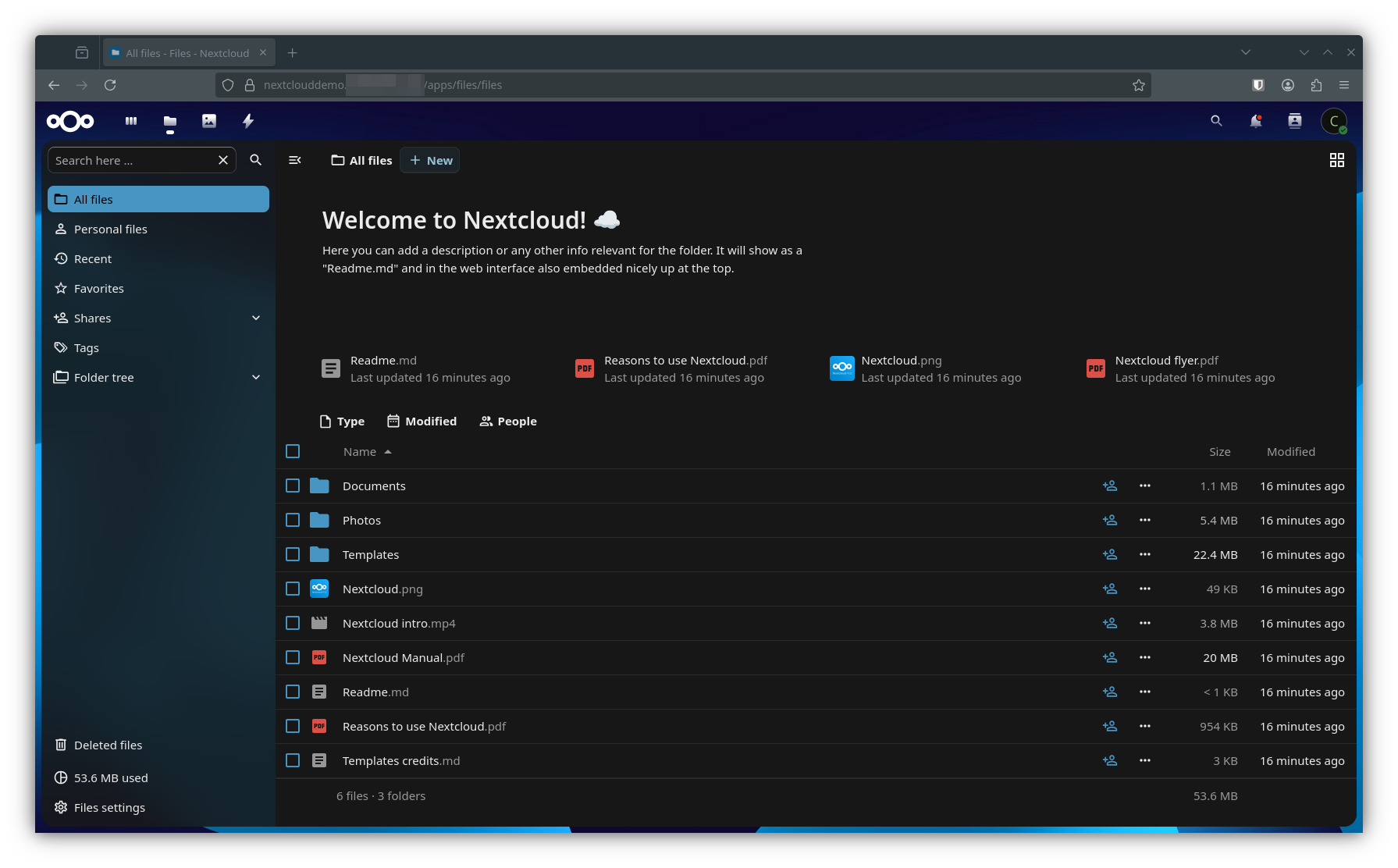
You can inspect the final results with the kubectl commands we’ve been using throughout the series.
Inspect all resources created in your cluster by the nextcloud-demo kustomization.
$ flux tree ks nextcloud-demo
Kustomization/flux-system/nextcloud-demo
├── Namespace/nextcloud-demo
└── HelmRelease/nextcloud-demo/nextcloud-demo
    ├── Secret/nextcloud-demo/nextcloud-demo-cnpg-main-provider-backup-s3-creds
    ├── Secret/nextcloud-demo/nextcloud-demo-cnpg-main-urls
    ├── Secret/nextcloud-demo/nextcloud-demo-cnpg-main-user
    ├── Secret/nextcloud-demo/nextcloud-demo-rediscreds
    ├── Secret/nextcloud-demo/nextcloud-demo-config-volsync-config
    ├── Secret/nextcloud-demo/nextcloud-demo-html-volsync-html
    ├── ConfigMap/nextcloud-demo/nextcloud-demo-redis-health
    ├── ConfigMap/nextcloud-demo/nextcloud-demo-clamav-config
    ├── ConfigMap/nextcloud-demo/nextcloud-demo-collabora-config
    ├── ConfigMap/nextcloud-demo/nextcloud-demo-hpb-config
    ├── ConfigMap/nextcloud-demo/nextcloud-demo-nextcloud-config
    ├── ConfigMap/nextcloud-demo/nextcloud-demo-nginx-config
    ├── ConfigMap/nextcloud-demo/nextcloud-demo-opcache
    ├── ConfigMap/nextcloud-demo/nextcloud-demo-php-tune
    ├── ConfigMap/nextcloud-demo/nextcloud-demo-redis-session
    ├── PersistentVolumeClaim/nextcloud-demo/nextcloud-demo-config
    ├── PersistentVolumeClaim/nextcloud-demo/nextcloud-demo-html
    ├── Service/nextcloud-demo/nextcloud-demo-redis
    ├── Service/nextcloud-demo/nextcloud-demo-clamav
    ├── Service/nextcloud-demo/nextcloud-demo-collabora
    ├── Service/nextcloud-demo/nextcloud-demo-imaginary
    ├── Service/nextcloud-demo/nextcloud-demo
    ├── Service/nextcloud-demo/nextcloud-demo-nextcloud
    ├── Service/nextcloud-demo/nextcloud-demo-notify
    ├── Deployment/nextcloud-demo/nextcloud-demo-clamav
    ├── Deployment/nextcloud-demo/nextcloud-demo-collabora
    ├── Deployment/nextcloud-demo/nextcloud-demo-imaginary
    ├── Deployment/nextcloud-demo/nextcloud-demo
    ├── Deployment/nextcloud-demo/nextcloud-demo-nginx
    ├── Deployment/nextcloud-demo/nextcloud-demo-notify
    ├── StatefulSet/nextcloud-demo/nextcloud-demo-redis
    ├── CronJob/nextcloud-demo/nextcloud-demo-nextcloud-cron
    ├── CronJob/nextcloud-demo/nextcloud-demo-preview-cron
    ├── Ingress/nextcloud-demo/nextcloud-demo-cloudflare
    ├── Ingress/nextcloud-demo/nextcloud-demo
    ├── Cluster/nextcloud-demo/nextcloud-demo-cnpg-main
    ├── ReplicationDestination/nextcloud-demo/nextcloud-demo-config-config-dest
    ├── ReplicationDestination/nextcloud-demo/nextcloud-demo-html-html-dest
    ├── ReplicationSource/nextcloud-demo/nextcloud-demo-config-config
    ├── ReplicationSource/nextcloud-demo/nextcloud-demo-html-html
    └── ScheduledBackup/nextcloud-demo/nextcloud-demo-cnpg-main-sched-backup-daily-backup
Verify volsync source and destination configuration:
$ kubectl get replicationdestinations.volsync.backube -n nextcloud-demo
NAME                                LAST SYNC              DURATION        NEXT SYNC
nextcloud-demo-config-config-dest   2025-11-28T16:43:47Z   32.604100966s
nextcloud-demo-html-html-dest       2025-11-28T16:43:45Z   30.501917968s
$ kubectl get replicationsources.volsync.backube -n nextcloud-demo
NAME                           SOURCE                  LAST SYNC              DURATION          NEXT SYNC
nextcloud-demo-config-config   nextcloud-demo-config   2025-11-28T16:46:37Z   3m22.289395955s   2025-11-29T01:10:00Z
nextcloud-demo-html-html       nextcloud-demo-html     2025-11-28T16:46:35Z   3m20.125654664s   2025-11-29T01:20:00Z
Inspect the CNPG cluster created for Nextcloud:
$  kubectl get cluster -n nextcloud-demo
NAME                       AGE   INSTANCES   READY   STATUS                     PRIMARY
nextcloud-demo-cnpg-main   18m   2           2       Cluster in healthy state   nextcloud-demo-cnpg-main-1

$ kubectl cnpg status -n nextcloud-demo nextcloud-demo-cnpg-main
Cluster Summary
Name                     nextcloud-demo/nextcloud-demo-cnpg-main
System ID:               7577817879212458003
PostgreSQL Image:        ghcr.io/cloudnative-pg/postgresql:16.11
Primary instance:        nextcloud-demo-cnpg-main-1
Primary promotion time:  2025-11-28 16:43:48 +0000 UTC (18m52s)
Status:                  Cluster in healthy state
Instances:               2
Ready instances:         2
Size:                    183M
Current Write LSN:       0/90D3EB8 (Timeline: 1 - WAL File: 000000010000000000000009)

Continuous Backup status
First Point of Recoverability:  2025-11-28T16:44:59Z
Working WAL archiving:          OK
WALs waiting to be archived:    0
Last Archived WAL:              000000010000000000000008   @   2025-11-28T17:00:03.47943Z
Last Failed WAL:                -

Streaming Replication status
Replication Slots Enabled
Name                        Sent LSN   Write LSN  Flush LSN  Replay LSN  Write Lag  Flush Lag  Replay Lag  State      Sync State  Sync Priority  Replication Slot
----                        --------   ---------  ---------  ----------  ---------  ---------  ----------  -----      ----------  -------------  ----------------
nextcloud-demo-cnpg-main-2  0/90D3EB8  0/90D3EB8  0/90D3EB8  0/90D3EB8   00:00:00   00:00:00   00:00:00    streaming  async       0              active

Instances status
Name                        Current LSN  Replication role  Status  QoS        Manager Version  Node
----                        -----------  ----------------  ------  ---        ---------------  ----
nextcloud-demo-cnpg-main-1  0/90D3EB8    Primary           OK      Burstable  1.27.1           truek8s-w2
nextcloud-demo-cnpg-main-2  0/90D3EB8    Standby (async)   OK      Burstable  1.27.1           truek8s-w1
Troubleshooting a failed deployment
If you have any issues during deployment (which is common - I did even while writing this guide) here are some steps to help:
- Determine the cause of failure: Use flux get hr to see if the chart was deployed successfully or not. It may fail if there’s an error in your helm-release.yaml. Example:
$ flux get hr -n nextcloud-demo
NAME            REVISION        SUSPENDED       READY   MESSAGE
nextcloud-demo 40.4.1 False False Helm install failed for release nextcloud-demo/nextcloud-demo with chart [email protected]: execution error at (nextcloud/templates/common.yaml:16:4): Nextcloud - Collabora [Password] cannot contain [$]-
Use kubectl describe pods on pods in the nextcloud-demo namespace. Look for unfulfilled persistent volume claims, or any pods in error state.
-
Restart and try again
– Suspend the KS with flux suspend ks nextcloud-demo.
– Delete the entire namespace with kubectl delete namespaces nextcloud-demo
– Delete any files written to your S3 bucket
– (unique to Nextcloud) delete any files written to the NFS shared by the failed deployment
– Make and commit your changes, then try again.
Sources
- trueforge.org: Nextcloud Installation Notes
- trueforge.org: VolySync
- trueforge.org: CNPG
- readthedocs.io: VolSync
- serverfault: Talos OS and TrueCharts - Failed to create network namespace for sandbox error
- trueforge.org: truecharts-common/podoptions