TrueK8S Part 08
Configuring VolSync and CNPG for Cluster Backup
One of the things that always made me a little wary of Kubernetes for the homelab was the overall resiliency. In a more traditional scenario running apps on a VM, you can just snapshot/backup the whole virtual machine and restore everything all at once. I would like to have the peace of mind to know that I can restore my apps and data should something ever go wrong. Moreover, I don’t want the management of those backups to constitute a full-time job (like writing this series has).
TrueCharts has a solution for that. All of the apps in the TrueCharts project ship with integration for VolSync and cloudnative PostgreSQL, which are mature solutions to providing resiliency in a Kubernetes environment. The TrueCharts common library provides a consistent mechanism I can use to backup and restore my deployments, which is one of the reasons I’m such a fan of the project.
In this installment, we’ll configure and test our backups before we move on to deploying any workloads or data into our cluster.
Configure Secrets
S3 secrets
Before we can get started, Volsync and CNPG need somewhere to store the backup data. I chose to use an S3 bucket hosted by Backblaze, but any S3 service should work. We’ll start by generating a credential to access our bucket.
In Backblaze, you can generate an application key by going to:
-
Backblaze > side panel > Application Keys
-
Add a new application key
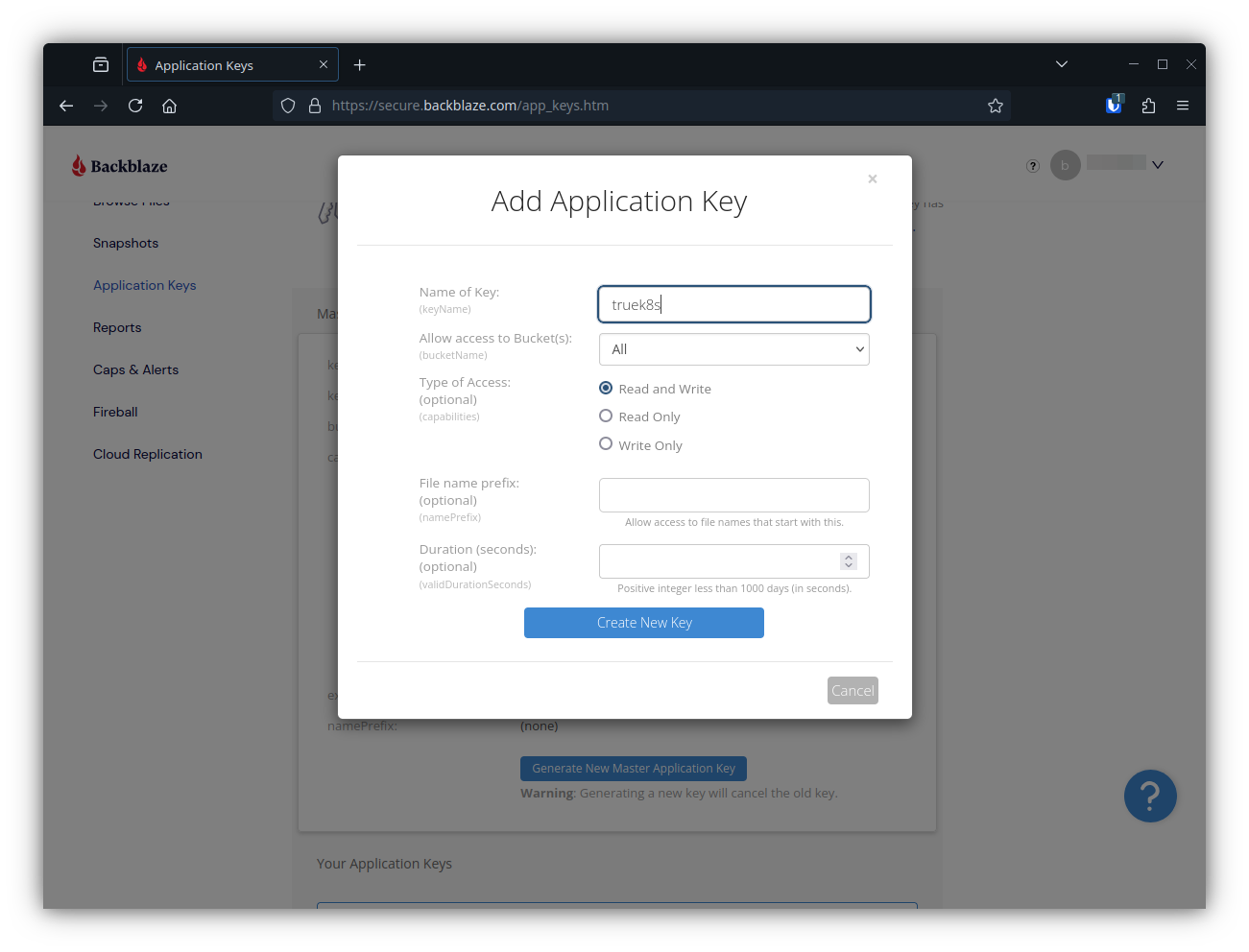
This will give you a Key ID and an application key (Secret). In addition to your key, you will create your own encryption key to encrypt data before it ever goes to the S3 bucket. You can put all three of these in your configmap:
apiVersion: v1
kind: ConfigMap
metadata:
    name: cluster-config
    namespace: flux-system
data:
    S3_URL: #The URL for your S3 service, e.g. https://s3.us-east-005.backblazeb2.com
    S3_BUCKET: # This is the base bucket name that will be used by all new buckets
    S3_ACCESS_KEY: #The Key ID
    S3_SECRET_KEY: # The application key (Secret)
    S3_ENCRYPTION_KEY: #User defined.
If I were you, I would make that encryption key 64+ random characters. Consider storing this key safely. If you lose the key you set here, you lose the ability to decrypt the data in your S3 bucket, and will be paying your s3 provider to host waste bits.
Make sure to re-encrypt your config map, then push the updates:
$ sops -e -i cluster-config.yaml
$ git add -A && git commit -m "Add secrets"
$ git push
Installing VolSync and CNPG
For this part, we need to configure 5 new kustomizations and their associated resources. This is a lot of content to copy, so I’ll provide the contents of each file in the usual fashion, but I’d also encourage you to check out the resources directly in my git repo. GitHub - TrueK8s
The kustomizations we’ll be creating are:
- cloudnative-pg
- kubernetes-reflector
- snapshot-controller
- volsync
- volsync-config
And these are the files we’ll need to create in our repo:
truek8s
├── infrastructure
│   ├── core
│   │   ├── cloudnative-pg
│   │   │   ├── helm-release.yaml
│   │   │   ├── kustomization.yaml
│   │   │   └── namespace.yaml
│   │   ├── kubernetes-reflector
│   │   │   ├── helm-release.yaml
│   │   │   └── kustomization.yaml
│   │   ├── snapshot-controller
│   │   │   ├── helm-release.yaml
│   │   │   ├── kustomization.yaml
│   │   │   └── namespace.yaml
│   │   ├── volsync
│   │   │   ├── helm-release.yaml
│   │   │   ├── kustomization.yaml
│   │   │   └── namespace.yaml
│   │   └── volsync-config
│   │       ├── kustomization.yaml
│   │       └── volumesnapshotclass.yaml
│   └── production
│       ├── cloudnative-pg.yaml
│       ├── kubernetes-reflector.yaml
│       ├── snapshot-controller.yaml
│       ├── volsync-config.yaml
│       └── volsync.yaml
└── repos
    └── cloudnative-pg.yaml
/infrastructure/core/cloudnative-pg
helm-release.yaml
apiVersion: helm.toolkit.fluxcd.io/v2
kind: HelmRelease
metadata:
    name: cloudnative-pg
    namespace: cloudnative-pg
spec:
    interval: 5m
    chart:
        spec:
            chart: cloudnative-pg
            sourceRef:
                kind: HelmRepository
                name: cloudnative-pg
                namespace: flux-system
            interval: 5m
    install:
        createNamespace: true
        crds: CreateReplace
        remediation:
            retries: 3
    upgrade:
        crds: CreateReplace
        remediation:
            retries: 3
    values:
      crds:
        create: true
kustomization.yaml
apiVersion: kustomize.config.k8s.io/v1beta1
kind: Kustomization
resources:
  - helm-release.yaml
  - namespace.yaml
namespace.yaml
apiVersion: v1
kind: Namespace
metadata:
    name: cloudnative-pg
/infrastructure/core/kubernetes-reflector
helm-release.yaml
apiVersion: helm.toolkit.fluxcd.io/v2
kind: HelmRelease
metadata:
    name: kubernetes-reflector
    namespace: snapshot-controller
spec:
    interval: 15m
    chart:
        spec:
            chart: kubernetes-reflector
            sourceRef:
                kind: HelmRepository
                name: truecharts
                namespace: flux-system
            interval: 15m
    timeout: 20m
    maxHistory: 3
    driftDetection:
      mode: warn
    install:
        createNamespace: true
        remediation:
            retries: 3
    upgrade:
        cleanupOnFail: true
        remediation:
            retries: 3
    uninstall:
        keepHistory: false
    values:
      podOptions:
        hostUsers: true
kustomization.yaml
apiVersion: kustomize.config.k8s.io/v1beta1
kind: Kustomization
resources:
  - helm-release.yaml
/infrastructure/core/snapshot-controller
helm-release.yaml
apiVersion: helm.toolkit.fluxcd.io/v2
kind: HelmRelease
metadata:
    name: snapshot-controller
    namespace: snapshot-controller
spec:
    interval: 5m
    chart:
        spec:
            chart: snapshot-controller
            sourceRef:
                kind: HelmRepository
                name: truecharts
                namespace: flux-system
            interval: 5m
    install:
        createNamespace: true
        remediation:
            retries: 3
    upgrade:
      cleanupOnFail: true
      crds: CreateReplace
      remediation:
        strategy: rollback
        retries: 3
    values:
      metrics:
        main:
          enabled: false
      podOptions:
        hostUsers: true
kustomization.yaml
apiVersion: kustomize.config.k8s.io/v1beta1
kind: Kustomization
resources:
  - helm-release.yaml
  - namespace.yaml
namespace.yaml
apiVersion: v1
kind: Namespace
metadata:
    name: snapshot-controller
    labels:
        pod-security.kubernetes.io/enforce: privileged
/infrastructure/core/volsync
helm-release.yaml
apiVersion: helm.toolkit.fluxcd.io/v2
kind: HelmRelease
metadata:
    name: volsync
    namespace: volsync
spec:
    interval: 5m
    chart:
        spec:
            chart: volsync
            sourceRef:
                kind: HelmRepository
                name: truecharts
                namespace: flux-system
            interval: 5m
    install:
        createNamespace: true
        remediation:
            retries: 3
    upgrade:
        remediation:
            retries: 3
    values:
      metrics:
        main:
          enabled: false
      podOptions:
        hostUsers: true
kustomization.yaml
apiVersion: kustomize.config.k8s.io/v1beta1
kind: Kustomization
resources:
  - helm-release.yaml
  - namespace.yaml
namespace.yaml
apiVersion: v1
kind: Namespace
metadata:
    name: volsync
    labels:
        pod-security.kubernetes.io/enforce: privileged
/infrastructure/core/volsync-config
kustomization.yaml
apiVersion: kustomize.config.k8s.io/v1beta1
kind: Kustomization
resources:
  - volumesnapshotclass.yaml
volumesnapshotclass.yaml
kind: VolumeSnapshotClass
apiVersion: snapshot.storage.k8s.io/v1
metadata:
  name: longhorn-snapshot-vsc
  annotations:
    snapshot.storage.kubernetes.io/is-default-class: 'true'
driver: driver.longhorn.io
deletionPolicy: Delete
parameters:
  type: snap
/infrastructure/production
cloudnative-pg.yaml
apiVersion: kustomize.toolkit.fluxcd.io/v1
kind: Kustomization
metadata:
  name: cloudnative-pg
  namespace: flux-system
spec:
  dependsOn:
    - name: longhorn
  interval: 10m
  path: infrastructure/core/cloudnative-pg
  prune: true
  sourceRef:
    kind: GitRepository
    name: flux-system
kubernetes-reflector.yaml
apiVersion: kustomize.toolkit.fluxcd.io/v1
kind: Kustomization
metadata:
  name: kubernetes-reflector
  namespace: flux-system
spec:
  dependsOn:
    - name: snapshot-controller
  interval: 10m
  path: infrastructure/core/kubernetes-reflector
  prune: true
  sourceRef:
    kind: GitRepository
    name: flux-system
snapshot-controller.yaml
apiVersion: kustomize.toolkit.fluxcd.io/v1
kind: Kustomization
metadata:
  name: snapshot-controller
  namespace: flux-system
spec:
  dependsOn:
    - name: longhorn
  interval: 10m
  path: infrastructure/core/snapshot-controller
  prune: true
  sourceRef:
    kind: GitRepository
    name: flux-system
volsync-config.yaml
apiVersion: kustomize.toolkit.fluxcd.io/v1
kind: Kustomization
metadata:
  name: volsync-config
  namespace: flux-system
spec:
  dependsOn:
    - name: volsync
  interval: 10m
  path: infrastructure/core/volsync-config
  prune: true
  sourceRef:
    kind: GitRepository
    name: flux-system
volsync.yaml
apiVersion: kustomize.toolkit.fluxcd.io/v1
kind: Kustomization
metadata:
  name: volsync
  namespace: flux-system
spec:
  dependsOn:
    - name: snapshot-controller
  interval: 10m
  path: infrastructure/core/volsync
  prune: true
  sourceRef:
    kind: GitRepository
    name: flux-system
/repos
cloudnative-pg.yaml
apiVersion: source.toolkit.fluxcd.io/v1
kind: HelmRepository
metadata:
  name: cloudnative-pg
  namespace: flux-system
spec:
  interval: 2h
  url: https://cloudnative-pg.github.io/charts
Don’t forget to add a reference to each in the production\kustomization file.
/infrastructure/production/kustomization.yaml
apiVersion: kustomize.config.k8s.io/v1beta1
kind: Kustomization
resources:
  - cert-manager.yaml
  - cluster-issuer.yaml
  - metallb.yaml
  - metallb-config.yaml
  - ingress-nginx.yaml
  - cf-tunnel-ingress.yaml
  - longhorn.yaml
  - longhorn-config.yaml
  - cloudnative-pg.yaml
  - kubernetes-reflector.yaml
  - snapshot-controller.yaml
  - volsync-config.yaml
  - volsync.yaml
/repos/kustomization.yaml
apiVersion: kustomize.config.k8s.io/v1beta1
kind: Kustomization
resources:
  - podinfo.yaml
  - jetstack.yaml
  - truecharts.yaml
  - metallb.yaml
  - ingress-nginx.yaml
  - strrl.yaml
  - longhorn.yaml
  - cloudnative-pg.yaml
After you’ve created those manifests, go ahead and push them.
$ git add -A && git commit -m "Add VolSync and CNPG"
$ git push
Verify deployment
Deploying VolSync and CNPG along with all their requirement components will create quite a few new resources in your cluster. Here are some commands you can use to verify successful deployment.
Start by checking to make sure the Kustomizations were applied correctly:
$ flux get ks
NAME                    REVISION                SUSPENDED       READY   MESSAGE
apps                    main@sha1:5a540e51      False           True    Applied revision: main@sha1:5a540e51
cert-manager            main@sha1:5a540e51      False           True    Applied revision: main@sha1:5a540e51
cf-tunnel-ingress       main@sha1:5a540e51      False           True    Applied revision: main@sha1:5a540e51
cloudnative-pg          main@sha1:5a540e51      False           True    Applied revision: main@sha1:5a540e51
cluster-issuer          main@sha1:5a540e51      False           True    Applied revision: main@sha1:5a540e51
config                  main@sha1:5a540e51      False           True    Applied revision: main@sha1:5a540e51
flux-system             main@sha1:5a540e51      False           True    Applied revision: main@sha1:5a540e51
infrastructure          main@sha1:5a540e51      False           True    Applied revision: main@sha1:5a540e51
ingress-nginx           main@sha1:5a540e51      False           True    Applied revision: main@sha1:5a540e51
kubernetes-reflector    main@sha1:5a540e51      False           True    Applied revision: main@sha1:5a540e51
longhorn                main@sha1:5a540e51      False           True    Applied revision: main@sha1:5a540e51
longhorn-config         main@sha1:5a540e51      False           True    Applied revision: main@sha1:5a540e51
metallb                 main@sha1:5a540e51      False           True    Applied revision: main@sha1:5a540e51
metallb-config          main@sha1:5a540e51      False           True    Applied revision: main@sha1:5a540e51
repos                   main@sha1:5a540e51      False           True    Applied revision: main@sha1:5a540e51
snapshot-controller     main@sha1:5a540e51      False           True    Applied revision: main@sha1:5a540e51
volsync                 main@sha1:5a540e51      False           True    Applied revision: main@sha1:5a540e51
volsync-config          main@sha1:5a540e51      False           True    Applied revision: main@sha1:5a540e51
Next make sure that the custom API resources for CNPG and backube are available in your cluster:
$ kubectl api-resources  | grep cnpg
backups                                                   postgresql.cnpg.io/v1                    true         Backup
clusterimagecatalogs                                      postgresql.cnpg.io/v1                    false        ClusterImageCatalog
clusters                                                  postgresql.cnpg.io/v1                    true         Cluster
databases                                                 postgresql.cnpg.io/v1                    true         Database
failoverquorums                                           postgresql.cnpg.io/v1                    true         FailoverQuorum
imagecatalogs                                             postgresql.cnpg.io/v1                    true         ImageCatalog
poolers                                                   postgresql.cnpg.io/v1                    true         Pooler
publications                                              postgresql.cnpg.io/v1                    true         Publication
scheduledbackups                                          postgresql.cnpg.io/v1                    true         ScheduledBackup
subscriptions                                             postgresql.cnpg.io/v1                    true         Subscription
$ kubectl api-resources  | grep volsync
replicationdestinations                                   volsync.backube/v1alpha1                 true         ReplicationDestination
replicationsources                                        volsync.backube/v1alpha1                 true         ReplicationSource
and also make sure that the custom snapshot class defined in volysnc-config has been created:
$ kubectl get volumesnapshotclass
NAME                    DRIVER               DELETIONPOLICY   AGE
longhorn-snapshot-vsc   driver.longhorn.io   Delete           11m
Deploy Vaultwarden for testing
Now that we’ve configured our backup mechanism, we should test it with a real deployment. I’ll walk you through deploying, destroying, and restoring a Vaultwarden instance. Vaultwarden is a password manager well maintained by the TrueCharts community. It’s ideal for our use case, because it will utilize almost every facet of our cluster we’ve configured so far. NGINX\Cloudflare ingress, certificates issued by cluster-issuer, persistent volumes provided by longhorn and backed up with VolSync, and a cloudnative postgresql cluster for backups.
VW Secrets
To get started, we need to prepare a secret admin token for our Vaultwarden instance. Go ahead and define one in your cluster-config configmap.
apiVersion: v1
kind: ConfigMap
metadata:
    name: cluster-config
    namespace: flux-system
data:
    VW_ADMIN_TOKEN: ###
❗ remember to re-encrypt your config map before proceeding
Vaultwarden Chart
Go ahead and create a vaultwarden directory under apps/general and create the following manifests:
truek8s
└── apps
   ├── general
   │   └── vaultwarden-test
   │       ├── helm-release.yaml
   │       ├── ks.yaml
   │       ├── kustomization.yaml
   │       └── namespace.yaml
   └── production
       └── vaultwarden-test.yaml
./apps/general/vaultwarden
kustomization.yaml
apiVersion: kustomize.config.k8s.io/v1beta1
kind: Kustomization
resources:
  - helm-release.yaml
  - namespace.yaml
namespace.yaml
apiVersion: v1
kind: Namespace
metadata:
    name: vaultwarden-test
helm-release.yaml
apiVersion: helm.toolkit.fluxcd.io/v2
kind: HelmRelease
metadata:
    name: vaultwarden-test
    namespace: vaultwarden-test
spec:
    interval: 60m
    chart:
        spec:
            chart: vaultwarden
            sourceRef:
                kind: HelmRepository
                name: truecharts
                namespace: flux-system
            interval: 60m
    install:
        createNamespace: true
        crds: CreateReplace
        timeout: 30m
        remediation:
            retries: 2
    upgrade:
        crds: CreateReplace
        timeout: 30m
        remediation:
            retries: 2
    values:
        global:
            stopAll: false
        credentials:
          backblaze:
            type: s3
            url: "${S3_URL}"
            bucket: "${S3_BUCKET}-vaultwarden-test"
            accessKey: "${S3_ACCESS_KEY}"
            secretKey: "${S3_SECRET_KEY}"
            encrKey: "${S3_ENCRYPTION_KEY}"
        ingress:
          main:
            enabled: true
            ingressClassName: internal
            integrations:
              traefik:
                enabled: false
              certManager:
                enabled: true
                certificateIssuer: letsencrypt-domain-0
            hosts:
              - host: vaultwarden-test.${DOMAIN_0}
                paths:
                  - path: /
                    pathType: Prefix
          cloudflare:
            enabled: true
            ingressClassName: cloudflare
            integrations:
              traefik:
                enabled: false
            hosts:
            - host: vaultwarden-test.${DOMAIN_0}
              paths:
              - path: /
                pathType: Prefix
        persistence:
            data:
              volsync:
              - name: data
                type: restic
                cleanupTempPVC: false
                cleanupCachePVC: false
                credentials: backblaze
                dest:
                  enabled: true
                src:
                  enabled: true
                  trigger:
                    schedule: 40 1 * * *
        cnpg:
            main:
              cluster:
                singleNode: true
#              mode: recovery
              backups:
                enabled: true
                credentials: backblaze
                scheduledBackups:
                  - name: daily-backup
                    schedule: "0 5 0 * * *"
                    backupOwnerReference: self
                    immediate: true
                    suspend: false
              recovery:
                method: object_store
                credentials: backblaze
        vaultwarden:
            admin:
                enabled: true
                token: ${VW_ADMIN_TOKEN}
The important config items in this manifest are:
- values.credentials
- This section provides the info and credentials to reach our S3 bucket. In this case, that is all stored in the cluster-config configmap, and will be the same for all charts except for the bucket name, which we’ll append with a static value for each chart.
- values.persistence
- This section performs two functions. It configures the persistent volumes for our deployment, and also configures VolSync for that volume. Vaultwarden needs one persistent volume named ‘data’ which you see defined here. Other persistent volumes can be defined using the same syntax under the persistence section.
- Take note of the dest and src configuration. This tells VolSync whether this volume should be a source of a backup (src: enabled: true) or the destination of a backup (dest: enabled: true). Setting both to true allows the PVC to both restore from an existing ReplicationDestination if one exists and then act as a backup source afterward
- Take note of the backup schedule, which does what it sounds like it does.
- values.cnpg
- This section configures CNPG, and can be a bit sticky. Unlike VolSync, CNPG seems to fail if restore is set to true and no backup exists. I run CNPG either in backup mode or in restore mode, but not in both. That’s why the mode: recovery line is commented out, we’ll explore that later in this post.
./apps/production
vaultwarden-test.yaml
apiVersion: kustomize.toolkit.fluxcd.io/v1
kind: Kustomization
metadata:
  name: vaultwarden-test
  namespace: flux-system
spec:
  dependsOn:
    - name: ingress-nginx
  interval: 10m
  path: apps/general/vaultwarden-test
  prune: true
  sourceRef:
    kind: GitRepository
    name: flux-system
And don’t forget to add a reference to apps/production/kustomization.yaml
apiVersion: kustomize.config.k8s.io/v1beta1
kind: Kustomization
resources:
  - vaultwarden-test.yaml
Commit and Test
Commit your changes:
$ git add -A && git commit -m "add vaultwarden test"
$ git push

$ flux events --watch
As soon as flux reconciles the HR, your cluster should get to work on the deployment. Switch to watching pods in the vaultwarden namespace. Pay particular attention to the VolSync and CNPG pods that appear, do their tasks, then complete. While it works, you can also watch volumes appear in the longhorn UI.
 kubectl get pods -n vaultwarden-test --watch
NAME                                           READY   STATUS              RESTARTS   AGE
vaultwarden-5d5c5bdcdb-djkw2                   0/1     Pending             0          6s
vaultwarden-cnpg-main-1-initdb-xrbt7           0/1     Pending             0          4s
volsync-dst-vaultwarden-data-data-dest-wz44l   0/1     ContainerCreating   0          5s
vaultwarden-cnpg-main-1-initdb-xrbt7           0/1     Pending             0          4s
vaultwarden-cnpg-main-1-initdb-xrbt7           0/1     Init:0/1            0          4s
vaultwarden-cnpg-main-1-initdb-xrbt7           0/1     Init:0/1            0          26s
volsync-dst-vaultwarden-data-data-dest-wz44l   1/1     Running             0          28s
vaultwarden-cnpg-main-1-initdb-xrbt7           0/1     PodInitializing     0          28s
vaultwarden-cnpg-main-1-initdb-xrbt7           1/1     Running             0          30s
volsync-dst-vaultwarden-data-data-dest-wz44l   0/1     Completed           0          32s
vaultwarden-cnpg-main-1-initdb-xrbt7           0/1     Completed           0          32s
volsync-dst-vaultwarden-data-data-dest-wz44l   0/1     Completed           0          33s
vaultwarden-cnpg-main-1-initdb-xrbt7           0/1     Completed           0          32s
vaultwarden-cnpg-main-1-initdb-xrbt7           0/1     Completed           0          33s
volsync-dst-vaultwarden-data-data-dest-wz44l   0/1     Completed           0          34s
vaultwarden-cnpg-main-1                        0/1     Pending             0          0s
vaultwarden-cnpg-main-1                        0/1     Pending             0          0s
vaultwarden-cnpg-main-1                        0/1     Init:0/1            0          0s
volsync-dst-vaultwarden-data-data-dest-wz44l   0/1     Completed           0          37s
volsync-dst-vaultwarden-data-data-dest-wz44l   0/1     Completed           0          37s
vaultwarden-cnpg-main-1                        0/1     Init:0/1            0          15s
vaultwarden-cnpg-main-1                        0/1     PodInitializing     0          16s
vaultwarden-5d5c5bdcdb-djkw2                   0/1     Pending             0          54s
vaultwarden-5d5c5bdcdb-djkw2                   0/1     Init:0/1            0          54s
vaultwarden-cnpg-main-1                        0/1     Running             0          17s
vaultwarden-cnpg-main-1                        0/1     Running             0          20s
vaultwarden-cnpg-main-1                        0/1     Running             0          24s
vaultwarden-cnpg-main-1                        1/1     Running             0          24s
vaultwarden-cnpg-main-2-join-6j6dw             0/1     Pending             0          0s
vaultwarden-cnpg-main-2-join-6j6dw             0/1     Pending             0          0s
vaultwarden-cnpg-main-2-join-6j6dw             0/1     Pending             0          1s
vaultwarden-cnpg-main-2-join-6j6dw             0/1     Pending             0          7s
vaultwarden-cnpg-main-2-join-6j6dw             0/1     Init:0/1            0          7s
vaultwarden-5d5c5bdcdb-djkw2                   0/1     Terminating         0          71s
vaultwarden-5d5c5bdcdb-4v6t6                   0/1     Pending             0          0s
vaultwarden-5d5c5bdcdb-4v6t6                   0/1     Pending             0          0s
vaultwarden-5d5c5bdcdb-4v6t6                   0/1     Init:0/1            0          0s
vaultwarden-5d5c5bdcdb-djkw2                   0/1     Init:ContainerStatusUnknown   0          73s
vaultwarden-5d5c5bdcdb-djkw2                   0/1     Init:ContainerStatusUnknown   0          73s
vaultwarden-5d5c5bdcdb-djkw2                   0/1     Init:ContainerStatusUnknown   0          73s
volsync-src-vaultwarden-data-data-2sgll        0/1     Pending                       0          0s
volsync-src-vaultwarden-data-data-2sgll        0/1     Pending                       0          0s
volsync-src-vaultwarden-data-data-2sgll        0/1     Pending                       0          7s
volsync-src-vaultwarden-data-data-2sgll        0/1     ContainerCreating             0          10s
vaultwarden-cnpg-main-2-join-6j6dw             0/1     Init:0/1                      0          33s
vaultwarden-cnpg-main-2-join-6j6dw             0/1     PodInitializing               0          35s
vaultwarden-cnpg-main-2-join-6j6dw             1/1     Running                       0          40s
vaultwarden-cnpg-main-2-join-6j6dw             0/1     Completed                     0          46s
vaultwarden-cnpg-main-2-join-6j6dw             0/1     Completed                     0          47s
vaultwarden-cnpg-main-2-join-6j6dw             0/1     Completed                     0          48s
vaultwarden-cnpg-main-2                        0/1     Pending                       0          0s
vaultwarden-cnpg-main-2                        0/1     Pending                       0          0s
vaultwarden-cnpg-main-2                        0/1     Init:0/1                      0          2s
vaultwarden-cnpg-main-2                        0/1     Init:0/1                      0          25s
vaultwarden-cnpg-main-2                        0/1     PodInitializing               0          26s
vaultwarden-cnpg-main-2                        0/1     Running                       0          30s
vaultwarden-cnpg-main-2                        0/1     Running                       0          32s
vaultwarden-cnpg-main-2                        0/1     Running                       0          33s
vaultwarden-cnpg-main-2                        1/1     Running                       0          34s
vaultwarden-cnpg-main-1-initdb-xrbt7           0/1     Completed                     0          2m24s
vaultwarden-cnpg-main-2-join-6j6dw             0/1     Completed                     0          84s
vaultwarden-cnpg-main-1-initdb-xrbt7           0/1     Completed                     0          2m24s
vaultwarden-cnpg-main-2-join-6j6dw             0/1     Completed                     0          84s
volsync-src-vaultwarden-data-data-2sgll        1/1     Running                       0          88s
volsync-src-vaultwarden-data-data-2sgll        0/1     Completed                     0          90s
volsync-src-vaultwarden-data-data-2sgll        0/1     Completed                     0          92s
volsync-src-vaultwarden-data-data-2sgll        0/1     Completed                     0          92s
volsync-src-vaultwarden-data-data-2sgll        0/1     Completed                     0          93s
volsync-src-vaultwarden-data-data-2sgll        0/1     Completed                     0          93s
vaultwarden-5d5c5bdcdb-4v6t6                   0/1     Init:0/1                      0          112s
vaultwarden-5d5c5bdcdb-4v6t6                   0/1     PodInitializing               0          113s
vaultwarden-5d5c5bdcdb-4v6t6                   0/1     Running                       0          2m10s
vaultwarden-5d5c5bdcdb-4v6t6                   0/1     Running                       0          2m21s
vaultwarden-5d5c5bdcdb-4v6t6                   1/1     Running                       0          2m33s
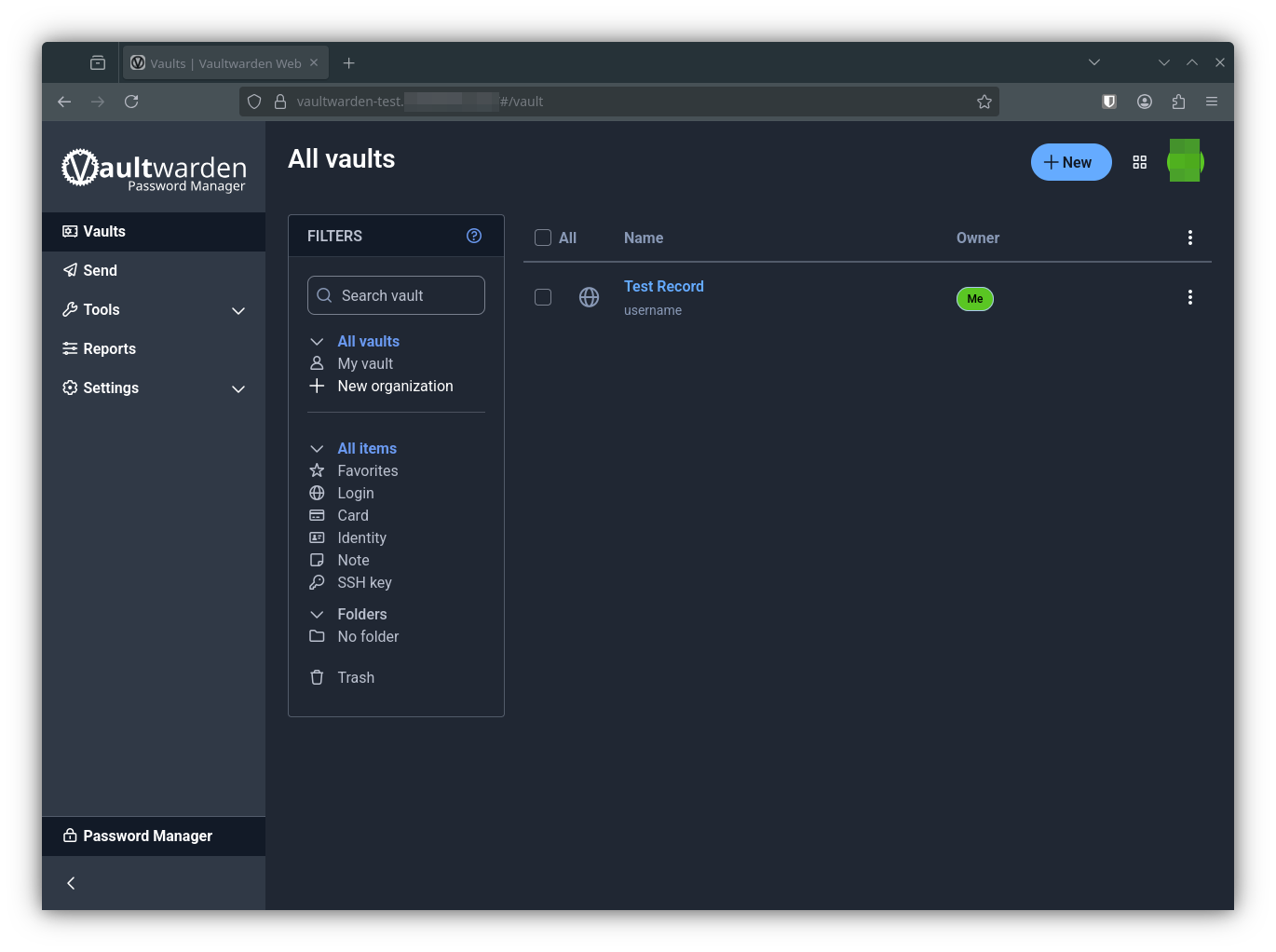
If everything went well, you should be able to reach vaultwarden at the ingress url you set up for it. Go ahead and create yourself a test record, You can verify this record later when we restore.
Inspect Your Backups
VolSync and CNPG both offer tools that you can use to inspect, verify, and administer your backups.
VolSync
You can inspect source and destination volume status with Kubectl.
$ kubectl get replicationdestinations.volsync.backube -n vaultwarden-test
NAME                              LAST SYNC              DURATION       NEXT SYNC
vaultwarden-test-data-data-dest   2025-11-28T01:56:41Z   27.96262596s
$ kubectl get replicationsources.volsync.backube -n vaultwarden-test
NAME                         SOURCE                  LAST SYNC              DURATION          NEXT SYNC
vaultwarden-test-data-data   vaultwarden-test-data   2025-11-28T02:02:01Z   5m47.901609977s   2025-11-29T01:40:00Z
If you install the VolSync plugin for kubectl VolSync.readthedocs.io, you can also manually migrate or replicate data. I have not used these commands, but I’m aware they exist, and you should be too.
$ kubectl volsync migration
$ kubectl volsync replication
CNPG
Likewise, you can find your CNPG cluster with kubectl and inspect it with the kubectl plugin clougnative-pg.io
$ kubectl get clusters.postgresql.cnpg.io -n vaultwarden-test vaultwarden-test-cnpg-main
NAME                         AGE   INSTANCES   READY   STATUS                     PRIMARY
vaultwarden-test-cnpg-main   10h   2           2       Cluster in healthy state   vaultwarden-test-cnpg-main-1
And to check health status.
$ kubectl cnpg status -n vaultwarden-test vaultwarden-test-cnpg-main
Cluster Summary
Name                     vaultwarden-test/vaultwarden-test-cnpg-main
System ID:               7577589366663393300
PostgreSQL Image:        ghcr.io/cloudnative-pg/postgresql:16.11
Primary instance:        vaultwarden-test-cnpg-main-1
Primary promotion time:  2025-11-28 01:57:07 +0000 UTC (10h28m55s)
Status:                  Cluster in healthy state
Instances:               2
Ready instances:         2
Size:                    176M
Current Write LSN:       0/9000060 (Timeline: 1 - WAL File: 000000010000000000000009)

Continuous Backup status
First Point of Recoverability:  2025-11-26T22:16:29Z
Working WAL archiving:          OK
WALs waiting to be archived:    0
Last Archived WAL:              000000010000000000000008   @   2025-11-28T02:08:20.28951Z
Last Failed WAL:                -

Streaming Replication status
Replication Slots Enabled
Name                          Sent LSN   Write LSN  Flush LSN  Replay LSN  Write Lag  Flush Lag  Replay Lag  State      Sync State  Sync Priority  Replication Slot
----                          --------   ---------  ---------  ----------  ---------  ---------  ----------  -----      ----------  -------------  ----------------
vaultwarden-test-cnpg-main-2  0/9000060  0/9000060  0/9000060  0/9000060   00:00:00   00:00:00   00:00:00    streaming  async       0              active

Instances status
Name                          Current LSN  Replication role  Status  QoS        Manager Version  Node
----                          -----------  ----------------  ------  ---        ---------------  ----
vaultwarden-test-cnpg-main-1  0/9000060    Primary           OK      Burstable  1.27.1           truek8s-w1
vaultwarden-test-cnpg-main-2  0/9000060    Standby (async)   OK      Burstable  1.27.1           truek8s-w2
Restore Test
A backup is only as good as its last verified restore point. Let’s go through the steps of restoring our vaultwarden instance.
Before you proceed, note that CNPG and VolSync take backups immediately upon deployment and then again on the scheduled defined in the helm-release. If you just deployed your chart and committed a record, you should wait for the next backup or trigger one manually using the commands above.
First, suspend the vaultwarden ks, then delete the entire vaultwarden namespace. That will delete all kustomizations, deployments, volumes, snapshots, etc.
$ flux suspend ks vaultwarden-test
► suspending kustomization vaultwarden-test in flux-system namespace
✔ kustomization suspended
#It will hang at this step for a while as longhorn works on deleting volumes and snapshots.
$ kubectl delete namespaces vaultwarden-test
namespace "vaultwarden-test" deleted
Now, you just need to edit your helm-release and tell CNPG that it needs to attempt to restore from backup. Just uncomment the cnpg.main.cluster.mode line in your helm-release.yaml.
        cnpg:
            main:
              cluster:
                singleNode: true
              mode: recovery
              backups:
                enabled: true
                credentials: backblaze
                scheduledBackups:
                  - name: daily-backup
                    schedule: "0 5 0 * * *"
                    backupOwnerReference: self
                    immediate: true
                    suspend: false
              recovery:
                method: object_store
                credentials: backblaze
Double check that the vaultwarden ks is suspended, and then commit your changes. Watch for the Vaultwarden Kustomization to be reconcile.
$ git add -A && git commit -m 'test vaultwarden restore'
$ flux get ks vaultwarden
NAME            REVISION                SUSPENDED       READY   MESSAGE
vaultwarden     main@sha1:af980727      True            True    Applied revision: main@sha1:af980727
$ flux resume ks vaultwarden
► resuming kustomization vaultwarden in flux-system namespace
✔ kustomization resumed
◎ waiting for Kustomization reconciliation
✔ Kustomization vaultwarden reconciliation completed
✔ applied revision main@sha1:9e77a508dbd94f59dd4d1e3c50bf7c2ede29587f
Pay attention to the Longhorn UI and watch pods in the vaultwarden namespace. Pay particularly close attention to the VolSync and CNPG pods that show up.
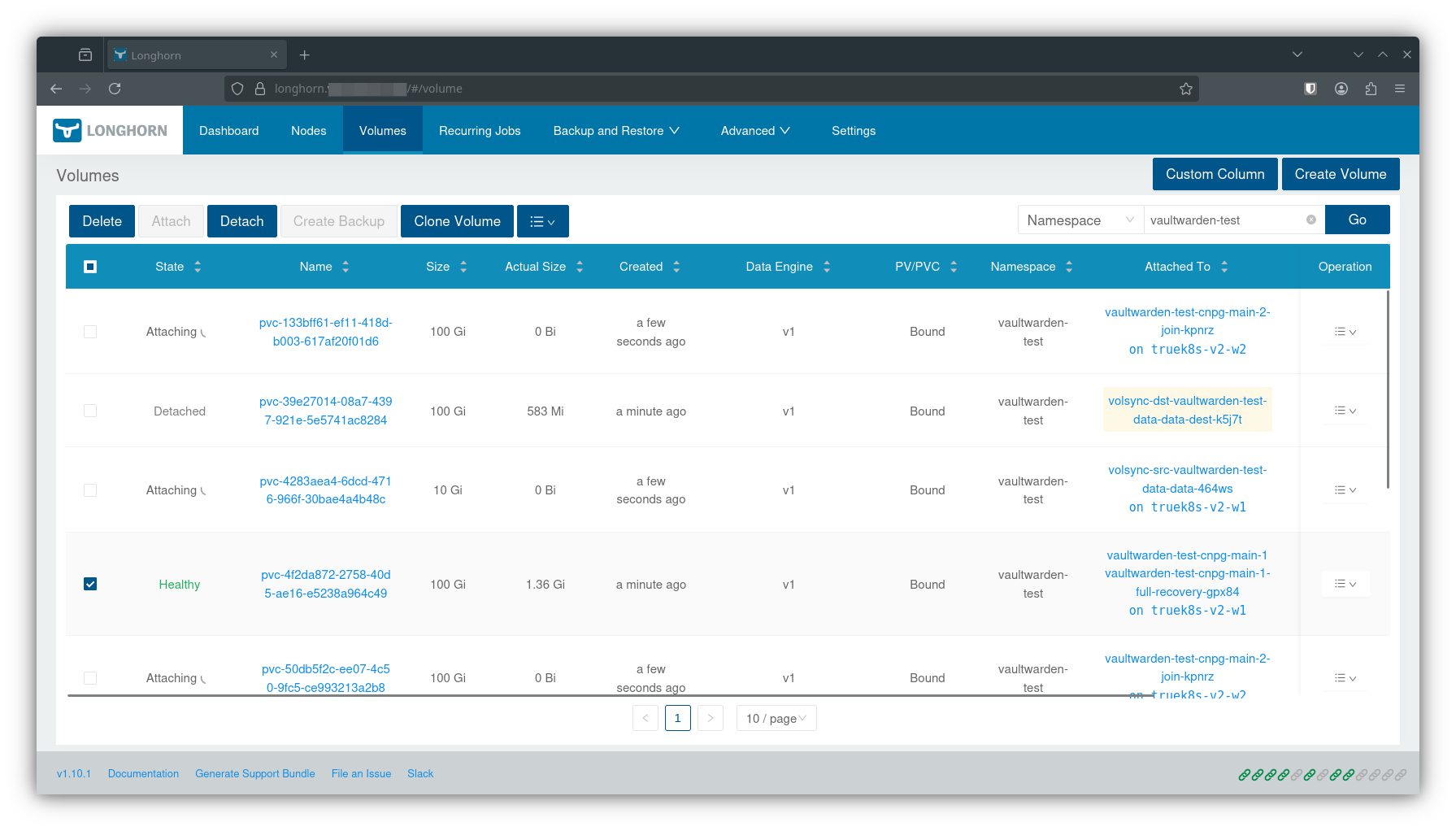
$ kubectl get pods -n vaultwarden-test --watch
NAME                                                READY   STATUS              RESTARTS   AGE
vaultwarden-test-7996596577-vtfsl                   0/1     Pending             0          6s
vaultwarden-test-cnpg-main-1-full-recovery-gpx84    0/1     Init:0/1            0          5s
volsync-dst-vaultwarden-test-data-data-dest-k5j7t   0/1     ContainerCreating   0          5s
volsync-dst-vaultwarden-test-data-data-dest-k5j7t   1/1     Running             0          15s
vaultwarden-test-cnpg-main-1-full-recovery-gpx84    0/1     PodInitializing     0          15s
vaultwarden-test-cnpg-main-1-full-recovery-gpx84    1/1     Running             0          16s
volsync-dst-vaultwarden-test-data-data-dest-k5j7t   0/1     Completed           0          20s
volsync-dst-vaultwarden-test-data-data-dest-k5j7t   0/1     Completed           0          21s
volsync-dst-vaultwarden-test-data-data-dest-k5j7t   0/1     Completed           0          22s
volsync-dst-vaultwarden-test-data-data-dest-k5j7t   0/1     Completed           0          22s
volsync-dst-vaultwarden-test-data-data-dest-k5j7t   0/1     Completed           0          22s
vaultwarden-test-7996596577-vtfsl                   0/1     Pending             0          32s
vaultwarden-test-7996596577-vtfsl                   0/1     Init:0/1            0          32s
vaultwarden-test-cnpg-main-1-full-recovery-gpx84    0/1     Completed           0          42s
vaultwarden-test-cnpg-main-1-full-recovery-gpx84    0/1     Completed           0          44s
vaultwarden-test-cnpg-main-1-full-recovery-gpx84    0/1     Completed           0          44s
vaultwarden-test-cnpg-main-1                        0/1     Pending             0          0s
vaultwarden-test-cnpg-main-1                        0/1     Pending             0          0s
vaultwarden-test-cnpg-main-1                        0/1     Init:0/1            0          0s
vaultwarden-test-cnpg-main-1                        0/1     PodInitializing     0          15s
vaultwarden-test-cnpg-main-1                        0/1     Running             0          16s
vaultwarden-test-cnpg-main-1                        0/1     Running             0          17s
vaultwarden-test-cnpg-main-1                        0/1     Running             0          24s
vaultwarden-test-cnpg-main-1                        1/1     Running             0          24s
vaultwarden-test-cnpg-main-2-join-kpnrz             0/1     Pending             0          0s
vaultwarden-test-cnpg-main-2-join-kpnrz             0/1     Pending             0          0s
vaultwarden-test-cnpg-main-2-join-kpnrz             0/1     Pending             0          0s
vaultwarden-test-cnpg-main-2-join-kpnrz             0/1     Pending             0          2s
volsync-src-vaultwarden-test-data-data-464ws        0/1     Pending             0          0s
volsync-src-vaultwarden-test-data-data-464ws        0/1     Pending             0          0s
vaultwarden-test-cnpg-main-2-join-kpnrz             0/1     Pending             0          3s
vaultwarden-test-cnpg-main-2-join-kpnrz             0/1     Init:0/1            0          3s
volsync-src-vaultwarden-test-data-data-464ws        0/1     Pending             0          2s
volsync-src-vaultwarden-test-data-data-464ws        0/1     ContainerCreating   0          2s
vaultwarden-test-cnpg-main-2-join-kpnrz             0/1     PodInitializing     0          25s
vaultwarden-test-cnpg-main-2-join-kpnrz             1/1     Running             0          26s
vaultwarden-test-cnpg-main-2-join-kpnrz             0/1     Completed           0          33s
vaultwarden-test-7996596577-vtfsl                   0/1     PodInitializing     0          103s
vaultwarden-test-cnpg-main-2-join-kpnrz             0/1     Completed           0          34s
vaultwarden-test-7996596577-vtfsl                   0/1     Running             0          104s
vaultwarden-test-cnpg-main-2-join-kpnrz             0/1     Completed           0          35s
vaultwarden-test-cnpg-main-2                        0/1     Pending             0          0s
vaultwarden-test-cnpg-main-2                        0/1     Pending             0          0s
vaultwarden-test-cnpg-main-2                        0/1     Init:0/1            0          0s
vaultwarden-test-cnpg-main-2                        0/1     Init:0/1            0          7s
vaultwarden-test-cnpg-main-2                        0/1     PodInitializing     0          8s
vaultwarden-test-cnpg-main-2                        0/1     Running             0          9s
vaultwarden-test-cnpg-main-2                        0/1     Running             0          10s
vaultwarden-test-7996596577-vtfsl                   0/1     Running             0          117s
vaultwarden-test-cnpg-main-2                        0/1     Running             0          15s
vaultwarden-test-cnpg-main-2                        1/1     Running             0          16s
vaultwarden-test-cnpg-main-1-full-recovery-gpx84    0/1     Completed           0          2m
vaultwarden-test-cnpg-main-1-full-recovery-gpx84    0/1     Completed           0          2m
vaultwarden-test-cnpg-main-2-join-kpnrz             0/1     Completed           0          51s
vaultwarden-test-cnpg-main-2-join-kpnrz             0/1     Completed           0          51s
vaultwarden-test-7996596577-vtfsl                   1/1     Running             0          2m9s
volsync-src-vaultwarden-test-data-data-464ws        1/1     Running             0          72s
volsync-src-vaultwarden-test-data-data-464ws        0/1     Completed           0          78s
volsync-src-vaultwarden-test-data-data-464ws        0/1     Completed           0          80s
volsync-src-vaultwarden-test-data-data-464ws        0/1     Completed           0          80s
volsync-src-vaultwarden-test-data-data-464ws        0/1     Completed           0          81s
volsync-src-vaultwarden-test-data-data-464ws        0/1     Completed           0          81s
You’ll know it worked when the main vaultwarden pod reaches ready status. Once it does, you should be able to log in and verify your test record.
If you run into any issues during the restore, use kubectl to inspect pods in the namespace and look for any errors. Most common points of failure are unfulfilled persistent volume claims due to issues with VolSync, or failure of one of the CNPG pods.
$ kubectl logs -n volsync volsync-8547d688c4-hf8ns volsync
$ kubectl logs -n cloudnative-pg cloudnative-pg-777f845d49-qssn5 manager
Advice and Troubleshooting Tips
Of all the features of the TrueCharts\K8S ecosystem, I would say I struggled the most with VolSync and CNPG, mostly because testing and breaking this is costly, and when things went wrong I would have to start all over. Almost the entire point of this whole series was wanting to really work out this backup component and try to share the guide for truecharts backups I wished I had when I set out on this project.
1. Replication is not backup
The title of this post is a bit of a misnomer… CNPG provides true backups through it’s revision feature, but VolSync is exactly what it says. A synchronization tool, not a backup tool. More than once I accidentally overwrote my ‘backups’ while trying to restore. Consider taking snapshots of your S3 buckets for an extra layer of protection.
2. Be safe, waste the space
You may notice that in my deployment cleanupTempPVC and cleanupCachePVC are set to false. I started doing this when I had issues restoring from VolSync backups, and found that VolSync was complaining that the target snapshot wasn’t available. This would cause volumes to be created, but VolSync wouldn’t 'release them, and the storage claim would never be fulfilled. I’m not sure exactly what the bug is, but one of the guys from TrueCharts told me there was a bug in VolSync and I should disable these features. I haven’t had any issues since.
3. Watch for volume not ready errors
While performing restore operations, keep an eye on pods as they spin up. If VolSync restore fails, your first hint will be that the pod is stuck in the pending state. If you check in longhorn, the volume will exist but will be in a not ready for workloads state because VolSync didn’t finish it’s job and release it. (see tip #2.) Inspect pods with kubectl describe pod to check for this.
4. Optionally manage CNPG Revisions manually
In earlier versions of the truecharts common library, CNPG required a revision statement for backup and recovery targets. This is no longer required, but is still supported if you want to manually manage backup revisions. If you do this, make sure you set the correct revision to restore, and also set the backup to an unused revision number, otherwise CNPG will complain about finding existing backups where it’s trying to write new ones.
  cnpg:
      main:
        cluster:
          singleNode: true
        mode: recovery
        backups:
          enabled: true
          revision: "2"
          credentials: backblaze
          scheduledBackups:
            - name: daily-backup
              schedule: "0 5 0 * * *"
              backupOwnerReference: self
              immediate: true
              suspend: false
        recovery:
          method: object_store
          revision: "1"
          credentials: backblaze
Sources
- trueforge.org: CNPG
- trueforge.org: VolSync
- trueforge.org: Enhanced Chart Backup and Restore Solutions